We're reaching out to ensure that our last response to your concerns.
Your satisfaction is important to us, and we want to ensure that all your questions have been answered comprehensively. If everything is clear and you are satisfied with the resolution, please let us know.
Please note that if we do not receive a response from you within the next 10 days, we will assume that your issue has been resolved and will close the ticket. You are welcome to reach out to us at any time in the future if you have further questions or concerns.
Thank you for choosing us, and we look forward to hearing from you.
Warm regards,
Androidworld
•
Sep 26, 2023
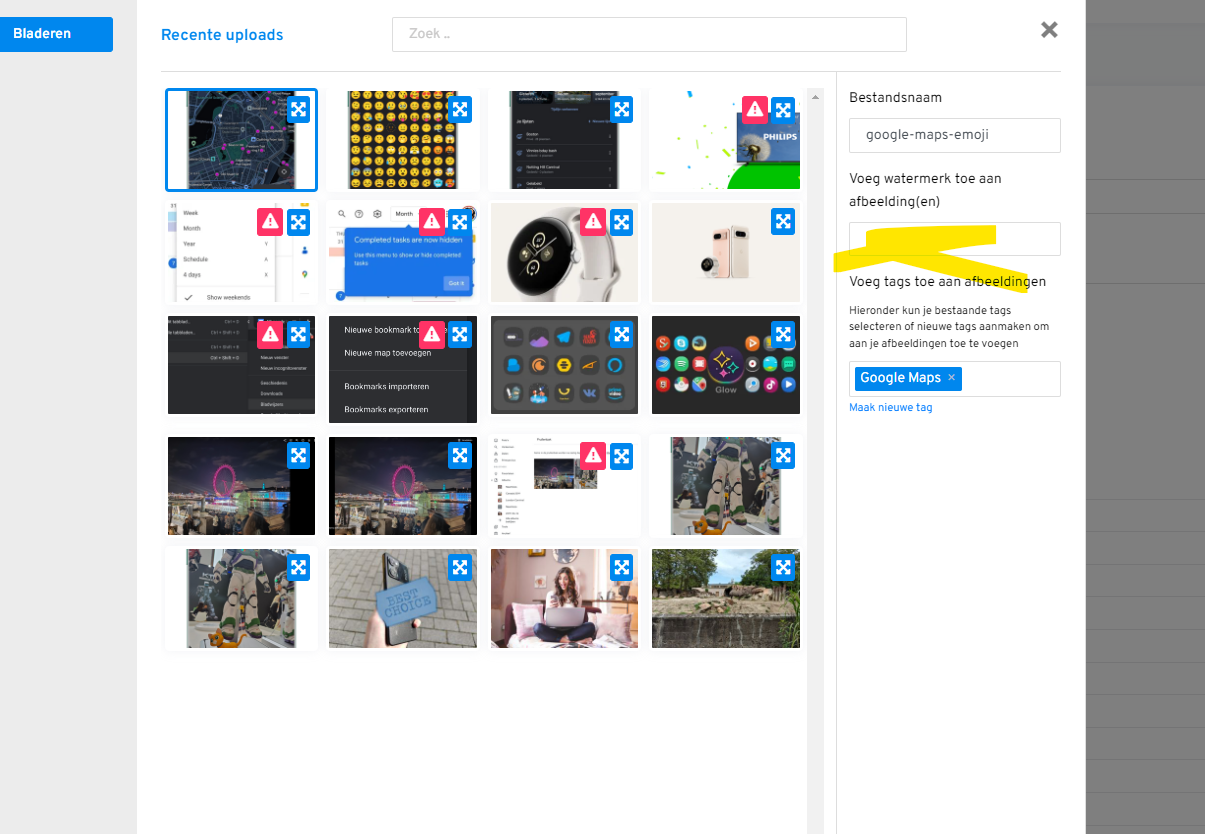
Hi! The taggable field is present. But the watermark itself is not visible on pictures when I add it after the picture has been uploaded. I'v add it to the photos in this article https://androidworld.nl/review/samsung-galaxy-tab-s9-ultra
Support
Team•
Sep 16, 2023
I hope this message finds you well. I'm reaching out to ensure that our last response to your concerns.
Your satisfaction is important to us, and we want to ensure that all your questions have been answered comprehensively. If everything is clear and you are satisfied with the resolution, please let us know, and we will proceed to close this ticket.
However, if you have any further questions or need additional clarification on any matter, please don't hesitate to reach out. Our team is here to assist you.
Support
Team•
Sep 9, 2023
Hello,
We've recently made some enhancements for a smoother user experience. The watermark field has been updated to a "taggable field".
If you're unfamiliar with taggable fields, here's a quick explanation: A taggable field allows you to start typing what you're looking for, and as you type, it will automatically search and show the relevant results in a dropdown list. If you don't see the watermark you want in the search results, you can simply finish typing the desired watermark and press "Enter". This will add your entry as a new watermark.
We hope this update provides a more intuitive and efficient experience. Should you have any questions or face any issues, please don't hesitate to let us know.
Log in to comment and vote
Comments4
Support
Sep 18, 2023
Dear Androidworld,
I hope this message finds you well.
We're reaching out to ensure that our last response to your concerns.
Your satisfaction is important to us, and we want to ensure that all your questions have been answered comprehensively. If everything is clear and you are satisfied with the resolution, please let us know.
Please note that if we do not receive a response from you within the next 10 days, we will assume that your issue has been resolved and will close the ticket. You are welcome to reach out to us at any time in the future if you have further questions or concerns.
Thank you for choosing us, and we look forward to hearing from you.
Warm regards,
Androidworld
Sep 26, 2023
Hi! The taggable field is present. But the watermark itself is not visible on pictures when I add it after the picture has been uploaded. I'v add it to the photos in this article https://androidworld.nl/review/samsung-galaxy-tab-s9-ultra
Support
Sep 16, 2023
I hope this message finds you well. I'm reaching out to ensure that our last response to your concerns.
Your satisfaction is important to us, and we want to ensure that all your questions have been answered comprehensively. If everything is clear and you are satisfied with the resolution, please let us know, and we will proceed to close this ticket.
However, if you have any further questions or need additional clarification on any matter, please don't hesitate to reach out. Our team is here to assist you.
Support
Sep 9, 2023
Hello,
We've recently made some enhancements for a smoother user experience. The watermark field has been updated to a "taggable field".
If you're unfamiliar with taggable fields, here's a quick explanation:
A taggable field allows you to start typing what you're looking for, and as you type, it will automatically search and show the relevant results in a dropdown list. If you don't see the watermark you want in the search results, you can simply finish typing the desired watermark and press "Enter". This will add your entry as a new watermark.
We hope this update provides a more intuitive and efficient experience. Should you have any questions or face any issues, please don't hesitate to let us know.